
Software Factory: How We Put Agents Into Defined Pipelines
A few weeks ago we had six terminal tabs open, each one a coding agent working a different task. It felt productive. It was not. We kept switching tabs to remember what each one was doing, gave feedback meant for tab 3 to tab 5, and lost track of which agent had actually finished versus which one was just sitting there waiting on us. The parallelism was real. The control was not.
That is the problem we built Local Software Factory to fix. Not “run more agents at once”, we already had that with six tabs. The actual fix was taking the job of holding context away from us and away from the conversation, and giving it to something that does not forget: a pipeline.
A Pipeline Is Not a Prompt
Our first instinct was to just write a longer prompt (or skill): “implement this, then review it, then run the tests.” That does not work, because it is still one conversation holding three different jobs, and the agent quietly blurs them together, the same way we were blurring six tabs together in our heads.
A pipeline in the factory is YAML, not a paragraph, inspired by GitHub Actions:
steps:
  code:
    uses: claude
    with:
      prompt: prompts/code.md
    next: commit

  commit:
    uses: shell
    with:
      run: "git add -A && git commit -m 'sf: worked by the factory'"
    on: { pass: done }
Each step says who does it (uses:) and what to hand them (with:). A step can be a coding agent, an ordinary shell command, or a typed judgment instead of either. The pipeline lives in the repo, versioned like everything else, so “how we implement” stops being a Slack thread or a half remembered tab and becomes a file with a diff history.
Every Request Gets Its Own Worktree
The tab problem was really a state problem. Six tabs meant six agents that could, in theory, step on the same files, and definitely stepped on our attention. Queue five requests in the factory and none of that happens, because none of them run in your working tree. Each one gets its own git worktree under ~/.sf/worktrees/, its own branch, and works there start to finish.
sf submit --description "add rate limiting to /upload" --name rate-limit --pipeline quick
sf run
sf status -m
sf status is the whole state of the world in one call, live, the thing we were trying and failing to hold in our heads across six tabs.
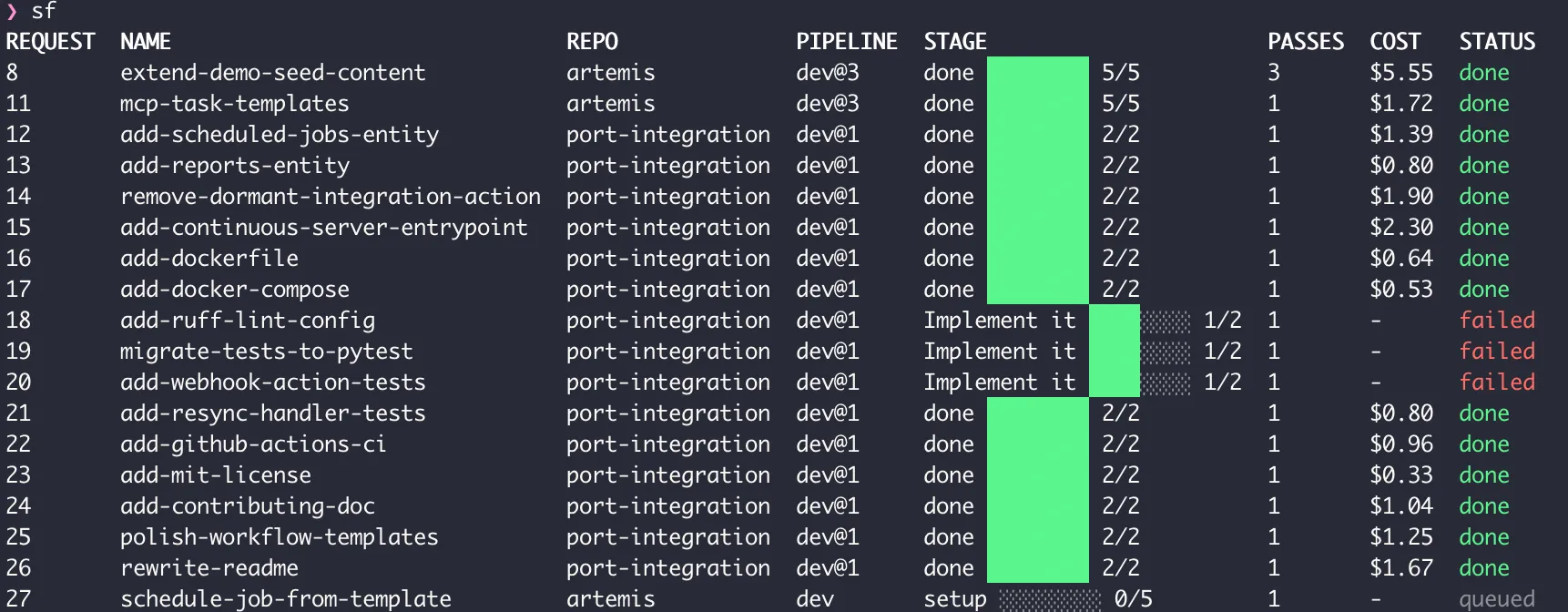
sf replay 1 plays a finished request back: every step, the route it took, what it produced. Nothing about a run is buried in scrollback once the terminal closes.
When One Pass Is Not Enough
The quick pipeline above works for small changes. Anything with more shape, a real feature, a bug fix that touches more than one file, needs a pipeline that can send work backwards, not just forwards. This is closer to what we actually run:
name: reviewed
max_passes: 3
concurrency: 2
start: plan

steps:
  plan:
    uses: claude
    with: { prompt: prompts/plan.md }
    output: plan.md
    next: code

  code:
    uses: claude
    with: { prompt: prompts/code.md }
    input: [plan.md, review.md]
    output: code.md
    next: test

  test:
    uses: shell
    with: { run: "pytest -q" }
    output: test.log
    on: { pass: review, fail: code }

  review:
    uses: claude
    with: { prompt: prompts/review.md }
    resume: false
    input: [plan.md, test.log]
    output: review.md
    on: { pass: done, fail: code }
Plan, implement, test, review. A failing test or a rejecting review sends the work back to code, and that edge carries the reviewer’s notes with it, so the second attempt is not starting cold. max_passes caps how many times that loop can run before the request parks and asks a human instead of spinning forever. resume: false on the review step is deliberate: the reviewer starts a fresh session instead of continuing the coder’s, because an agent reviewing its own conversation is not a review.
That last part is the opinion we hold most strongly. The failure mode we kept seeing, in our own six-tab mess and in every agent setup we have watched, is asking the same agent that wrote the code whether the code is good. It always says yes. A pipeline does not let the foreman decide that. A request only reaches done when a separate step, tests, a cold review, or a Jev judgment, says so.
No New API Bill
The factory does not call a model API and meter you by the token. Each step runs the agent CLI you already installed, on the subscription you already pay for. Run claude setup-token once, and every pipeline step that says uses: claude runs against it. Five requests in parallel cost what five requests already cost on your existing plan, not a new line item, and not five more tabs to babysit.
Try It
uv tool install software-factory
sf init
It is MIT licensed, on PyPI, and built to run on your own machine against agents you already have installed. We did not need more agents running at once. We needed to stop being the thing holding six of them together in our heads. If that sounds familiar, the queue is the fix, not another tab.